











































www.farmgolds.com

Categories

    Demon’s Souls: How to Change Servers

    Tags: ,

    Share To Your:

    Developed by From Software and originally released for the PS3 about a decade ago, Demon’s Souls is finally seeing another resurgence in popularity as it’s been remade from the ground up by Bluepoint Games and released for the PS5 as a launch title. The remake features a complete graphical overhaul and tons of little enhancements and improvements but retains the core gameplay that fans know and love. Here’s how to change servers in Demon’s Souls.

    Changing Servers in Demon’s Souls

    While this is primarily a single-player game, the multiplayer aspect in Demon’s Souls can be pretty enjoyable as well, especially if you decide to get into the PvP side of things. While the netcode for the game back in the PS3 days were just decent at best, Bluepoint seems to have improved it quite a bit with the remake.

    From what we’ve played so far, latency issues don’t seem to be as pronounced, and Bluepoint has even gone one step further by allowing players to decide what server they want to play on. This can be extremely useful if you’re playing at an odd hour in your own region, and want to get more connections in a more lively region at that point in time.

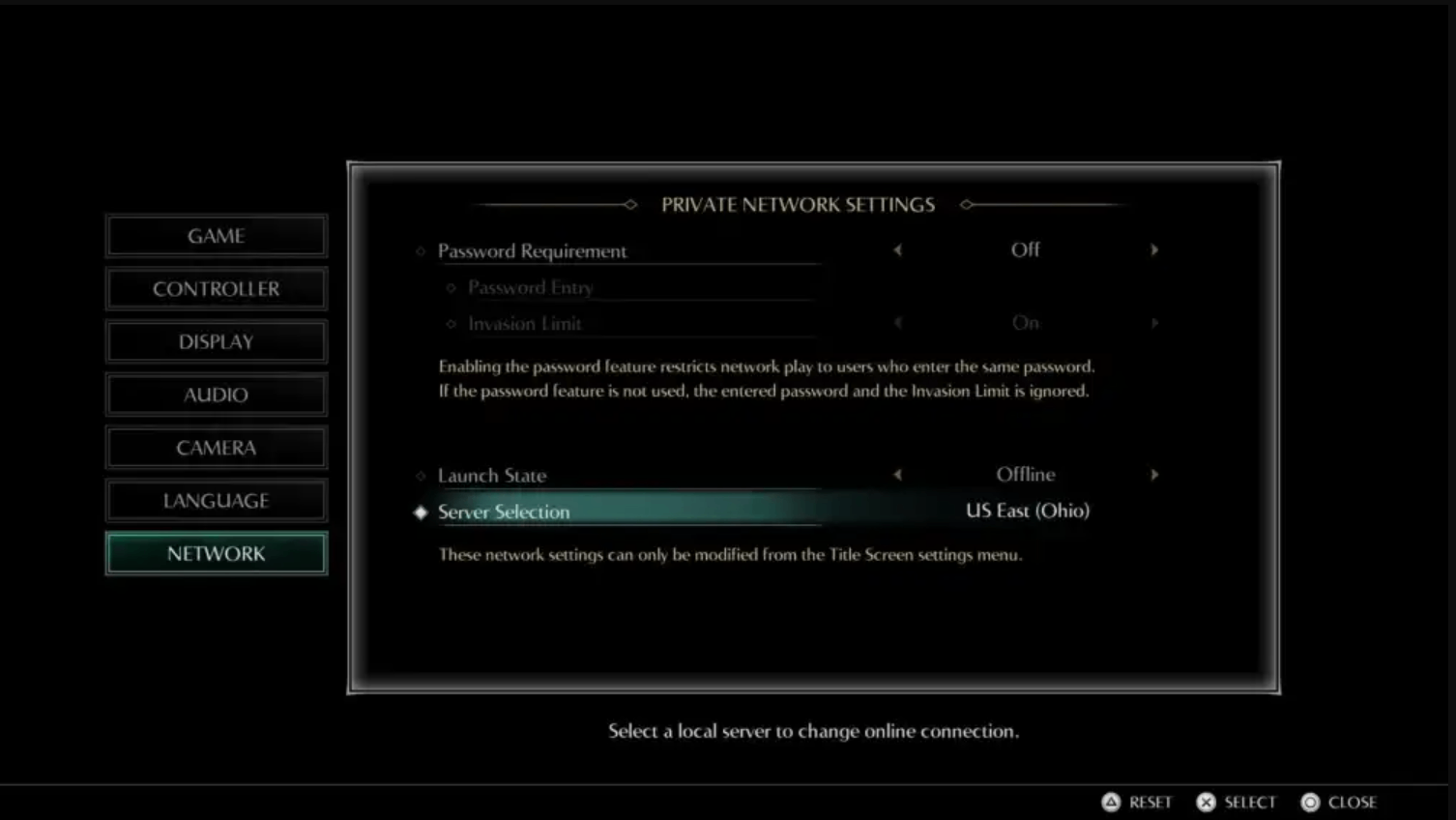
    First, you need to go to the game’s title menu and access the settings from there. Go to Network, then select the Server Selection option at the bottom.

    First, you need to go to the game’s title menu and access the settings from there. Go to Network, then select the Server Selection option at the bottom.


    image.png


    From here, you’ll see a full list of servers you can choose from, along with the ping relative to where you’re located at the moment. Of course, if you choose to connect to a region that’s far away from you, the ping will be higher and you’ll be more likely to run into lag and connection issues. However, with a good internet connection, you shouldn’t have too much trouble with that. We’d still recommend choosing a region that’s closer to you, though.

    Once you’ve changed servers, boot up the game again and try invading or summoning. Whenever you want to go back to your own region, access the settings again from the title menu to change servers.

    Jan-11-2023


    Game News
    • Where To Find All Estus Shards in Dark Souls 3
      Where To Find All Estus Shard…
      Heres where to find all Estus Shards in Dark Souls 3, which are needed to fully upgrade the Estus Flask. The Estus Flask is a vital healing item and can only be upgraded with Estus Shards . By finding …

      2025-08-27 PST

    • Dark Souls 3: Top 10 Mistakes New Players Should Avoid
      Dark Souls 3: Top 10 Mistakes…
      OverviewEmbarking on your first journey through Dark Souls 3? This guide highlights ten common pitfalls that new players often encounter. By understanding and avoiding these mistakes, you can enhance …

      2025-08-26 PST

    • A list of Illusory Wall locations in Dark Souls 3
      A list of Illusory Wall locat…
      Illusory walls are fake walls that disappear when hit with a weapon, revealing new passageways, secret areas, and sometimes even access to secret bossesIllusory Wall LocationsFirelink Shrine One is loc…

      2025-08-25 PST

    • Dark Souls: Remastered: 10 Rarest Rings ( Where To Find Them)
      Dark Souls: Remastered: 10 Ra…
      OverviewRings in Dark Souls: Remastered offer beneficial effects and stat boosts, but some are harder to find than others. This guide details 10 of the rarest rings in the game and where to find them, …

      2025-08-19 PST

    Live Chat